How it worksFeeds

Feeds

The intelligence we publish
to your team.

Briefings, alerts, scorecards, and customer updates — we deliver them to the right person, in the right format, on schedule or on trigger. The operation finds you. You never have to go looking.

See how it works →
Ops DirectorMorning Briefing07:30 daily
SupervisorSLA Alerton trigger
BoardPerformance Scorecardmonthly
CustomerOrder Status Updateon milestone
FinanceAccount Statementmonthly
VendorCompliance Documenton event
PlanningDemand Forecastmonthly
Care ManagerRisk Briefing07:00 daily
Ops DirectorMorning Briefing07:30 daily
SupervisorSLA Alerton trigger
BoardPerformance Scorecardmonthly
CustomerOrder Status Updateon milestone
FinanceAccount Statementmonthly
VendorCompliance Documenton event
PlanningDemand Forecastmonthly
Care ManagerRisk Briefing07:00 daily

Automated Intelligence Delivery

The briefing arrives before the meeting. Always.

Zipdata generates the right output for each person in your operation. The ops director gets the morning briefing. The supervisor gets the alert. The customer gets the status update. The board gets the scorecard. Automatically. On cadence. Without anyone assembling it.

A morning in manufacturingHow the briefing builds itself before 8am
OTIF Agent fires

Scans 14 orders within 48h of delivery window

Risk flags queued

At-risk orders identified by production stage

Briefing generated

KPI summary + exceptions + recommended actions

Briefing delivered

In the ops director's inbox — before standup

Actions approved

One-click approval on escalation drafts

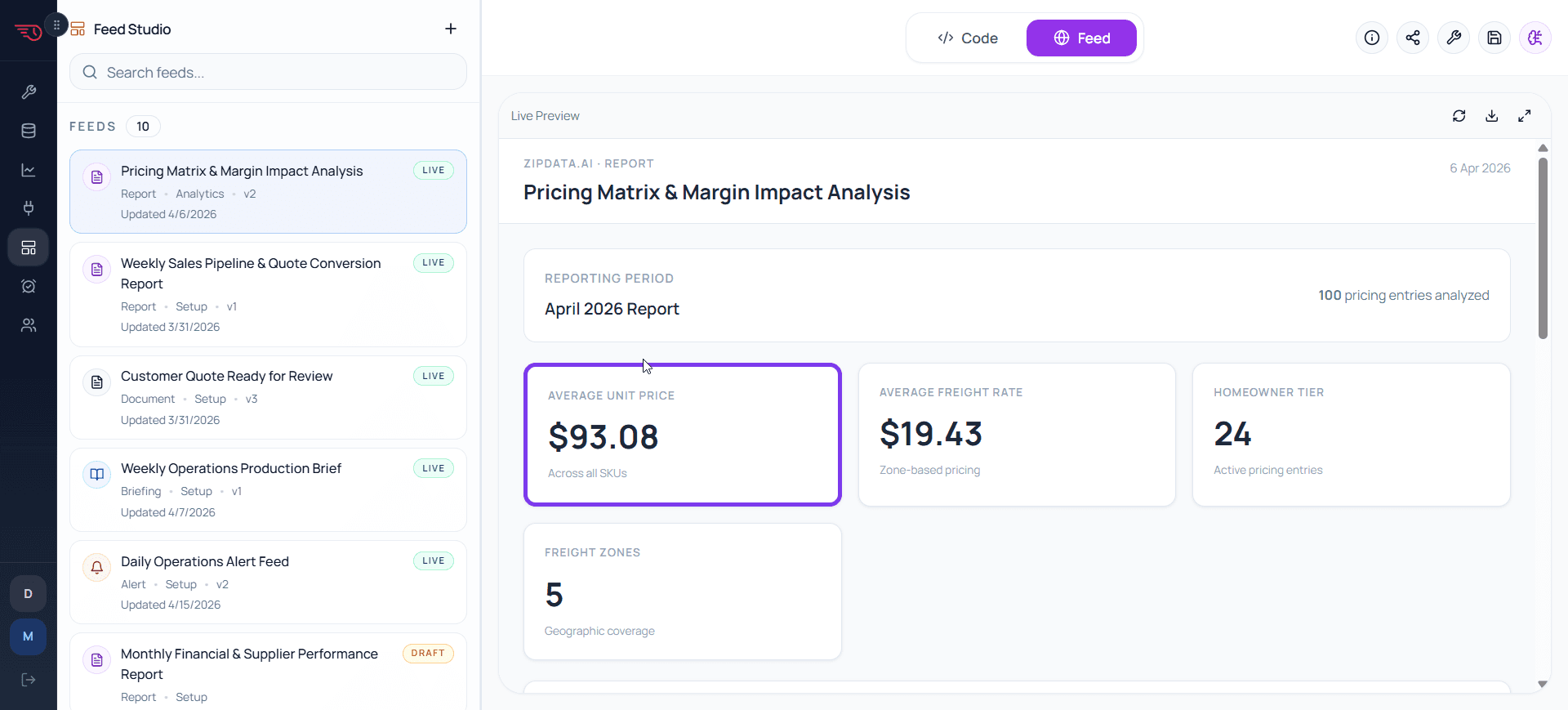
Feed Studio — briefing builder
Feed Studio
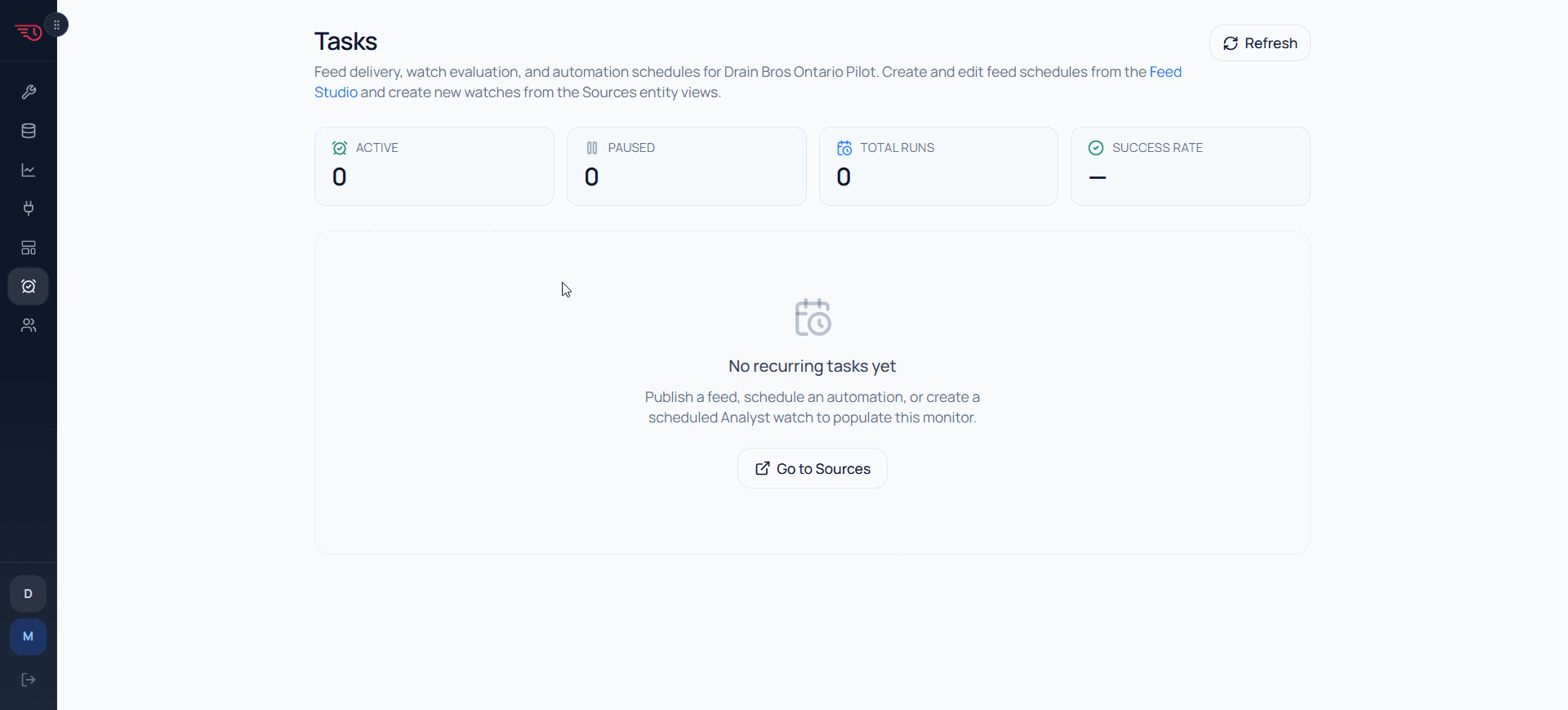
Tasks — schedule monitor
Tasks schedule monitor

Why Feeds

Feeds are how the operation reaches the people running it.

Watches surface what changed. Agents reason about it. Feeds deliver the result — dashboards and reports, generated documents and statements, briefings and approval-ready alerts — to the right person, on a committed schedule. Push, not pull.

Static dashboard

  • Best for live exploration and standing views
  • Usually designed for internal users
  • Requires the reader to visit the product
  • Often separate from document or email delivery
  • Does not naturally personalize by audience

Feed

  • Works for dashboards, briefings, reports, alerts, and documents
  • Formatted for the group receiving it
  • Generated from workspace data or automation output
  • Scheduled, shared, or trigger-based
  • Can reach internal and external audiences

Feed Types

Twelve formats. Three audiences.

Internal rhythm for leaders and managers. External updates for customers. All generated from live workspace data.

internal

Internal operating rhythm

Briefings, dashboards, scorecards, alerts, reports, and forecasts for the people running the operation.

daily

Briefing

The 07:30 operational briefing: KPIs, exceptions, and recommended actions for the leadership team.

daily

Dashboard

Live KPI grid updated from query data .

monthly

Scorecard

Metric performance table against targets .

trigger

Alert

Fires only when the watch condition is met .

weekly

Report

A sortable, filterable table of any workspace entity .

monthly

Forecast

Projection chart from current trend data .

external

External stakeholder outputs

Customer updates, documents, commercials, statements, and promos generated from the same live record.

trigger

Customer Update

Status card sent directly to the customer when an order or job milestone is reached.

trigger

Document

Certificates, compliance packs, deviation reports, and branded quotes .

trigger

Commercial

Line-item commercial output .

monthly

Statement

Transaction statement with running balance .

trigger

Promo

Promotional communication generated from customer segment data and offer configuration.

mixed

Shared notifications

Compact updates that can route internally or externally depending on the trigger and audience.

trigger

Notification

Compact header notification for internal or external audiences .

Generation Flow

Generated from live data. Shaped for the audience. Delivered on your cadence.

No copy-paste, no manual template filling, and no dashboard that waits for someone to remember it. The briefing is built from current data and saved as a versioned artifact.

01

Query fires

The linked analytics query pulls live workspace data — orders, jobs, accounts, or KPI snapshots — at the scheduled time.

02

The feed builds itself

Feed Studio takes the query results and assembles a complete, self-contained feed — charts, tables, narrative, and recommended actions — shaped for the audience it is going to.

03

Auto-saved and versioned

The artifact is automatically saved to workspace-documents storage. Every version is immutable and linkable.

04

Tasks schedule delivery

Tasks hold the committed delivery cadence — daily, weekly, monthly. The feed arrives before the meeting that depends on it.

05

Groups receive delivery

Workspace groups define the audience. Members get the briefing in their inbox. External recipients get a secure share token.

Authoring Paths

Two ways to author a feed. One delivery engine.

Not every publication should be generated fresh each time — and not every structured document can be left to a language model. Feed Studio supports both.

LLM Generation

  • Right for briefings, alerts, dashboards, and scorecards
  • The analyst reasons over live query data and writes the publication
  • Output changes each run — reflects current operational state
  • Narrative, charts, and recommended actions shaped per audience
  • Demo wedge: the morning briefing that writes itself

Template (Jinja)

  • Right for certificates, compliance packs, CAPA documents, branded quotes
  • Author the template once — bind variables to live entity fields or queries
  • Output is identical every time — no LLM variation
  • Validated at upload, versioned, every build traced to exact template checksum
  • The compliance pack that has to look exactly right, every time
Both paths use the same workspace feeds, versioned artifacts, task schedules, and group delivery machinery. Only the origin differs.

Agent Output

Feeds are how agents communicate with humans.

When an agent detects an anomaly, runs a scheduled program, or prepares an escalation, its output becomes a feed: drafted, approved, scheduled, delivered, and logged.

OTIF Agent

Trigger fires

OTIF drops below threshold and 14 orders are within 48 hours of expected delivery.

Feed Studio

Briefing generated

The agent creates an exception feed with charts, records, root-cause notes, and a recommended action.

Governance

Approval enforced

Internal briefing is auto-drafted. Customer-facing escalation waits in Pending Actions for one-click approval.

Delivery

The right feed to the right person at the right time.

Scheduling is the contract: the feed arrives before the operating cadence that depends on it.

Committed delivery schedule

Daily, weekly, or monthly with a committed send time. The ops briefing arrives at 07:30 every working day — not when someone remembers to send it.

Audience groups

Workspace groups define who gets what. Leadership gets the briefing; the board gets the scorecard; customers get the update. One workspace, many audiences.

External share tokens

Recipients outside the workspace get a secure, time-limited share link. No login required. The link expires on the schedule you set.

Trigger-based dispatch

Some feeds run on cadence; others fire only when a watch condition is met. The same engine handles both with a single configuration model.

Immutable version history

Every generated artifact is saved and linkable. The 14 March briefing is still there in March next year — bit-identical, audit-grade.

Delivery observability

Tasks shows last run, next run, status, and every version. Failures surface immediately; reruns are one click; provenance is always available.

Intelligence that arrives.
No one has to go looking.

We configure the workspace, seed realistic data, and deliver the first automated briefing before the demo call. No engineering. No templates to fill. Just a briefing that arrives before the meeting that depends on it.